AI in Healthcare
Best Health Tech for Managing Multiple Chronic Conditions


With technology advancing daily, chronic diseases like diabetes and heart disease are now easier to manage. The all-in-one health technologies are built to integrate everything. We will discuss the 6 best health tech for managing multiple chronic conditions.
As one-stop solutions for chronic disease management continue to grow mainstream, the focus is shifting from basic tracking to real-time, connected care. These platforms consolidate data from wearable devices, remote patient monitoring, AI-powered insights, and coordinated care across the ecosystem. Rather than waiting until symptoms worsen, these tools enable patients and care teams to identify symptoms, and modify treatment plans.
What Is a Chronic Condition?
A chronic disease is a condition that needs long-term care or management. Such diseases require long-term treatment, and a lifestyle change may be necessary. For instance, diabetes, hypertension, heart disease, asthma, arthritis, chronic kidney disease, and COPD.
It’s hard to keep track when you have many long-term health problems. Treatments for one disease can affect another, symptoms can look the same, and care often require a visit to several consultants. This is why in today’s healthcare, you will see integrated health technology platforms, devices and apps.
Best Health Tech for Managing Multiple Chronic Conditions
These platforms support multiple chronic conditions, remote monitoring, patient engagement, analytics, and clinical workflows within a single platform. They are:
HealthSnap
HealthSnap is a virtual care management platform that specializes in chronic conditions such as hypertension, diabetes, and heart failure. It integrates Remote Patient Monitoring (RPM), Chronic Care Management (CCM), and Principal Care Management (PCM) to provide ongoing, proactive care.
This platform enables providers to capture daily health metrics and keeps patients and care teams connected which is essential when multiple chronic conditions exist.
Features
- RPM and CCM in one interface
- Real-time device data
- Interoperability with 80+ EHR systems
- AI-guided care coordination
- Population health analytics
- Automated billing support (CPT codes)
- Mobile app.
HealthArc
HealthArc is a digital health platform, powered by AI. It enables remote monitoring with predictive interventions. Also, it integrates with EHRs and leverages easy-to-use cellular-enabled devices.
Features
- AI-based analytics and BOT coaching
- Real-time vital data transmission from connected devices
- Integrated audio/video interactions
- Predictive care planning and population-level signals
- Cellular devices.
KangarooHealth
The KangarooHealth platform is centered on connected care with remote monitoring, chronic care pathways, and real-time data dashboards. It covers more than 50 chronic conditions and enables clinicians to take preemptive action.
Features
- Device-agnostic support (100+ compatible devices)
- Real-time alerts and configurable workflows
- Patient engagement with secure messaging and encrypted communication
- Billing support and caregiver coordination tools
- Multilingual clinical teams for personalized care touchpoints.
ChronicCareIQ
ChronicCareIQ is a full-spectrum care management tool that makes it easy for patients and providers to coordinate. It consolidates chronic care, RPM, primary care, transitional care, behavioral collaboration, and billing capture in a single platform.
The strength of ChronicCareIQ is workflow efficiency. It enables teams to care for complex chronic conditions.
Features
- Remote Patient Monitoring (RPM)
- Chronic Care Management (CCM)
- Real-Time Data & Alerts
- Automated Time Tracking & Billing
- Patient Engagement Tools: Includes (iOS/Android), text, or email.
- System Integration
- Transition of Care Management.
Signallamp
Signallamp integrates clinical expertise and technology to deliver nurse-led chronic care programs. Its services provide continuity with patient-centric longitudinal care and help reduce system costs. This model combines reliable clinical care with digital tools, which is useful when a patient has several related chronic illnesses.
Features
- Managed Services & Compliance
- No-Tech, Automated Data
- Embedded Clinical Staff
- Real-Time Monitoring & Triage
- Rapid Launch & Integration
- High Engagement
- Turnkey Technology
- Financial Model.
All-In-One Wearable Devices & Health Apps

Wearables and mobile health apps are the tools you use every day. They track data, process, and deliver insights.
iHealth Next
iHealth Labs offers several smart monitoring devices, such as blood pressure monitors, glucose meters, pulse oximeters, and scales, all of which can be synced with mobile apps that allow you to monitor trends over time straight on your phone.
- 12 Body Composition Metrics
- High-Precision Sensors
- Smart Connectivity & Syncing
- Multi-User Recognition
- Design & Durability
- App Integration.
While the standard Connect App for iHealth Next supports measurement syncing and vital tracking, the main innovation lies in everyday data in integrated care plans.
MedWand
MedWand is a compact, FDA-approved, multi-function device that allows healthcare providers to perform full physical examinations remotely. It is used in listening to heart and lung sounds, check temperature, capture images, and obtain ECG readings.
The sophisticated multi-sensor ecosystem transforms one device into a virtual clinic tool. A consideration that makes the device helpful for patients who cannot access traditional healthcare settings.
Features
- Clinical-grade vital signs and exam information from anywhere
- Integrate with EHR and telehealth workflows
- Facilitates chronic disease and longitudinal care management
- Reduces emergency room visits and travel burdens
- Provides full-body remote exam capabilities.
ChroniSense Medical (Polso)
ChroniSense Medical’s Polso is an FDA-cleared medical device that enables remote monitoring of vital signs—pulse rate, blood oxygen, respiration rate, etc.
Features
- Companion app and cloud platform
- Medical-Grade Parameters
- Radial Artery Monitoring
- Advanced Sensors
- Additional Parameters in Development
- EWS Support.
How to Manage Multiple Chronic Diseases

Managing multiple chronic illnesses is not an easy task. It requires the use of certain tools to help make living with chronic illness a little easier.
When using tools for managing chronic illness, healthcare providers and patients need to understand how the tools work to maximize their benefits. The steps to understand how these tools work are fairly straightforward. Review the following steps:
1. Organize Your Data
Take advantage of platforms that aggregate readings from sensors, wearables, and apps into a single view so you and your care team can recognize patterns and correlations.
2. Automate Daily Tracking
Wearables, glucometers, or smart blood pressure devices auto-capture readings and automatically sync to apps, lessening the burden of manual tracking.
3. Talk to Your Care Team
Clinicians have access to-live data, and they can intervene earlier, with dashboards that can be shared and patient engagement features on the platforms.
4. Use Alerts & Predictive Signals
AI-driven alerts can help identify when a person’s readings may be deviating from their normal range, giving them or their health care provider a heads up so that they can take action before things get worse.
5. Follow Personalized Care Plans
An Integrated Care Platform enables individuals to self-manage their healthcare on a regular basis, with the support of a healthcare professional, while also maintaining a level of protection which can be modified as the individual’s needs change.
The 5 C’s of Chronic Disease Management
The 5C’s of high-quality chronic disease care can help healthcare professionals summarize key components of providing care for patients with chronic diseases. The 5C’s of Chronic Disease Care are listed below:
1. Care Coordination
Care Coordination involves synchronizing the care provided to the patient by multiple providers and treatments to ensure that nothing goes unnoticed or falls between the cracks.
2. Continuous Monitoring
Continuous Monitoring utilizes the capabilities of wearable technology and Real-Time Monitoring of Patient Data to capture patient information every single day, as opposed to just during an in-person appointment.
3. Communication
Both patients and clinicians have direct and active communication with each other, often through patient messaging portals.
4. Coaching / Education
Provide individualized patient education and coaching to the patient, including reminder, tips and AI-based prompts that would allow the patient to better manage their own health.
5. Compliance
Tracking and reminding to help patients adhere to medication, therapies, and lifestyle changes with varying levels of support from the platforms and technologies that are described.
Manage Chronic Disease Conditions via Wearables?
Several technologies now combine wearables and care platforms:
- ChroniSense Polso—medical-grade wearable for vital sign monitoring.
- iHealth products—such as blood pressure monitors and glucose meters sync with mobile apps for blood pressure, glucose, oxygen saturation, and more.
- Connected care platforms (HealthSnap, HealthArc, KangarooHealth) that leverage device and wearable data.
These systems process raw physiologic data into actionable health information that care providers can use to dynamically modify care plans.
The best app for chronic disease management
The best ones include some combination of tracking, insights, reminders, and provider connectivity:
- HealthSnap / HealthArc / KangarooHealth apps—with provider teams and clinical platforms.
- iHealth MyVitals & Partner Apps—daily vital monitoring from devices.
- ChronicCareIQ app—connects self-management and clinical coordination.
Health Tech for Multi-Morbidities
Living with multiple chronic conditions can be traumatic. The symptoms usually overlap, medication interactions occur, and tracking these variables on a daily basis can be a source of frustration for patients.
Health care technologies created for one disease may not offer adequate support for patients with multiple chronic conditions. In order to be of value to patients, these products must address multiple conditions rather than focusing on a single diagnosis.
Consolidate complexity
All-in-one health solutions were created to consolidate multiple layers of complexity into one view. By collecting all health-related data in a single view, these solutions allow patients to visualize how their conditions are interacting with one another. This can make day-to-day management more transparent and easier to handle.
Most Important Features
The most successful health technology products help patients manage their illnesses and get the full benefits out of their health care systems. Many of these products are based on the same model. They provide information about a patient’s vital signs, current medications and symptoms.
Daily Tracking
Manual health tracking is tiring if you do it daily. Connected devices take some of this load away. Blood pressure monitors, glucose meters, and wearables capture data automatically.
Gradually, this data reveals trends. Patients and doctors alike can observe what is working and where they need to focus their energies. This translates into going on offense sooner and being surprised by your health less.
All Your Meds in One Place
Having multiple conditions often means multiple medications. Doses and schedules to keep track of. Health tools that are integrated also keep medication lists in one place.
This prevents missing doses of medication and/or getting mixed up. It is helpful to know if there are any side effects or treatment conflicts. Better organization leads to better and safer care.
Stay Connected to Your Care Team
Chronic care doesn’t stop when your clinic visit does. Health technology facilitates continuous communication and seamless delivery of care via safe messaging and notifications.
Wearable Devices: Their Purpose
Wearables offer a view of everyday health in real time. They monitor vital signs both day and night. Such a constant stream of data allows early identification of alterations. Early identification can help people with multiple chronic conditions avoid serious complications.
Creating a Long-Term Regimen
Health technology must be used in the context of daily life. The most effective tools are the ones that seamlessly integrate into the background and provide direction when called upon.
Stress is reduced by the use of notifications, automation, and clear communication. That helps patients gain confidence and keeps them engaged in their care.
Coordinating Care
For multiple comorbid conditions, individualized care should include integrated treatment. In addition, the end-user – the patient – should be able to use the technology easily. Any health technologies should take a “whole-person” approach to deliver a cohesive, predictable manner of care delivery. So, the patient is able to manage their conditions better and experience a higher quality of life.
What to Do When You Have Multiple Health Problems
When chronic conditions collide:
- Centralize tracking with apps or wearables and funnel that data to your clinician.
- Track vitals continuously with remote patient monitoring (RPM) tools when available.
- Establish a care team communication protocol with texting, video visits, and alerts.
- Create feasible self-care goals and set up alerts.
- Make treatment decisions in conjunction with your provider based on periodic reviews of your aggregated health information.
Read also: Home Medical Device Insurance in the USA
Conclusion
When platforms, devices, and applications are integrated, they lessen the day-to-day burden of symptom, medication, and treatment tracking for multiple conditions. This linked view enables patients and care teams to concentrate on patterns and progress, rather than bits of information.
All-in-one health technology enables better collaboration because essential data, care plans, and communication are centralized. This helps to handle coexisting therapies, maintain consistency in routines, and to anticipate changes in health.
The evolution of health technology continues to follow the changes in health care needs. A good health tech option for managing multiple chronic conditions is suitable for long-term use and is easy for the patient to use, allowing them to remain engaged without feeling overwhelmed.
When patients use appropriate technology to manage chronic conditions, the chronic condition management becomes more balanced, more informed, and therefore, more sustainable for the patients.

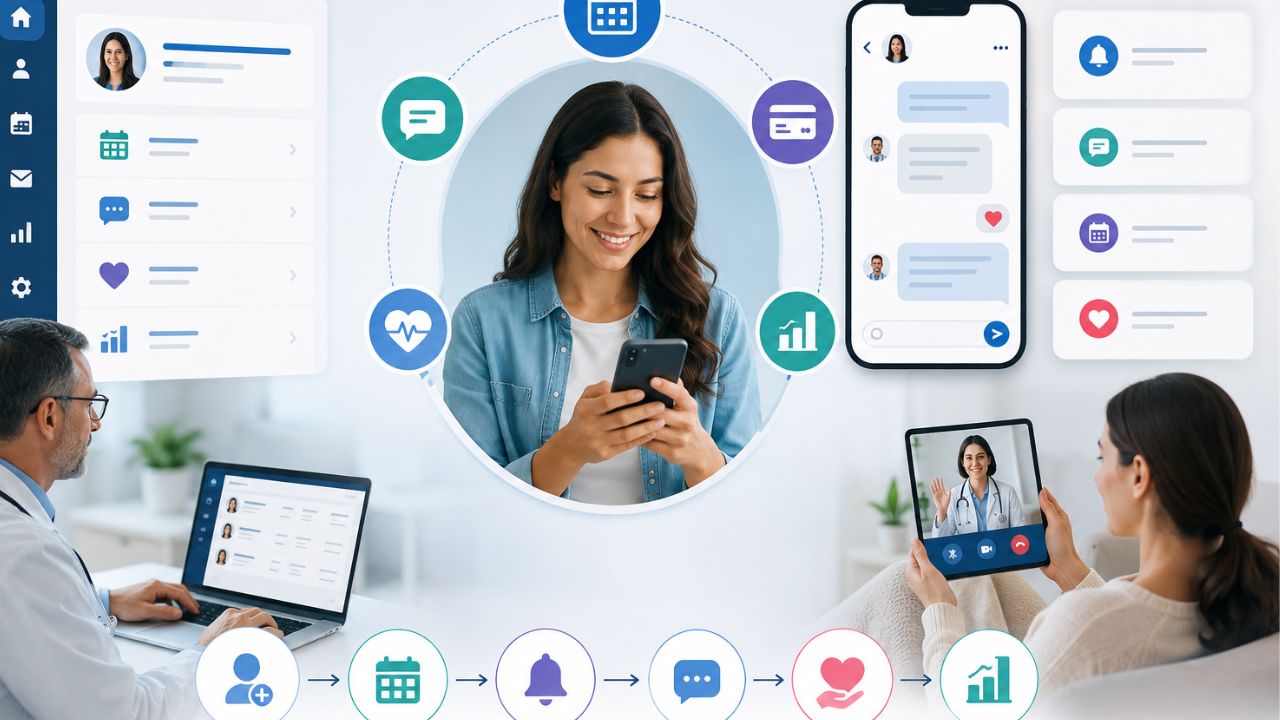
Patient engagement software changes the way that a practice can communicate with its patients. It can share updates, send reminders, and make healthcare feel more personal. In a busy hospital, effective communication improves trust and satisfaction. The truth is that many patients want constant monitoring from their doctors. Also, medical practitioners need a simple way to communicate with patients.
However, good engagement does more than sending messages. It supports follow-ups and builds relationships between patients and their healthcare teams.
Patient Portal vs. EHR vs. Patient Engagement Software
You may be familiar with a patient portal or an Electronic Health Record (EHR) system, but they serve different purposes.
Patient Portal
A patient portal is mainly for patients. They can:
- View their health records
- Check lab results
- See appointment details
- Message their provider in some cases
EHR
An EHR is built for healthcare workers. It stores clinical data and supports documentation. Also, it helps healthcare teams manage patient information better.
Patient Engagement Software
This one helps medical practices:
- Manage schedules
- Send appointment reminders
- Enable two-way messaging
- Collect online forms
- Gather patient feedback
What Patient Engagement Software Does
This solution gives medical teams a platform to handle reminders, online forms, messaging, and follow-up workflows through a cloud-based system. With the right solution, medical practices can reduce phone calls, cut down wait times, and free staff from repetitive administrative work.
Patients benefit as well. They can confirm appointments, complete intake forms online, receive timely reminders, and stay connected to their care team.
The point here is that patient portals and EHRs manage access to information, while patient engagement software improves communication, workflow, and patient experience.
Who Benefits Most?
The software can be used across these healthcare facilities:
- Primary care practices
- Specialty clinics
- Large, multi-site healthcare organizations
- Independent providers
- High-volume offices that need stronger workflow support
Note that this software doesn’t replace your EHR. Instead, they work together to improve the patient experience and reduce workload.
For example, it can reduce no-shows. It sends automated appointment reminders and allows patients to complete intake forms before they arrive.
Why Should You Care?
If your facility always has overflowing phone lines, low portal adoption, or staff burnout, the patient engagement software can ease the pressure.
It can:
- Cut down no-shows
- Speed up patient intake
- Reduce the workload on your team
- Improve communication with patients
- Support HIPAA and TCPA compliance
Signs It’s Time for a New Solution
A strong patient engagement platform should make life easier for both your staff and your patients. Watch for these warning signs:
High no-show rates
When patients miss appointments all the time, it can affect revenue.
Long hold times
If patients are constantly waiting to speak with someone, your team feels the pressure too.
Filling form challenges
Paper forms and manual check-ins slow everything down and leave more room for mistakes.
Low portal adoption
If patients aren’t using your online portal, you’re missing a simple way to improve communication and scheduling.
Staff burnout
When your team spends too much time handling routine calls or tracking down paperwork, it means the system is not working the way it should.
Must-Have Features for Every Platform
Secure Two-Way Texting
Many patients already prefer texting over phone calls, so your platform should make that easy, but safe. The key is to ensure that every message is HIPAA-compliant and sent with TCPA consent in place. With two-way texting, your team can confirm appointments and answer quick questions.
Automated Appointment Reminders
Automated reminders is essential especially when patients miss their appointments often. The best platforms allow you to send reminders via text or email.
In addition, it gives you control over timing, message content, and delivery settings. That flexibility helps you match the system to your clinic’s workflow instead of forcing your team to adjust to rigid software.
Online Intake Forms with E-Signature
Paper forms create delays, add extra work, and leave room for errors. Digital intake forms solve that when patients complete and sign everything before arrival.
Self-Scheduling Options
Giving patients the ability to book or reschedule appointments online. It cuts down on phone calls, gives patients more control, and fits into their busy schedules. Integrating EHR, can prevent double bookings and keep everything in sync.
Patient Review Collection Tools
Positive patient reviews can do a lot for your clinic’s reputation. With automated review requests sent after visits, it encourages satisfied patients to share their experiences on platforms like Google or Healthgrades.
Integration: How to Make It Work With Your EHR and PM
When dealing with patient no-shows, slow intake, and staff burnout, the last thing you need is a patient engagement platform that doesn’t connect easily with your existing EHR (Electronic Health Record) and PM (Practice Management) systems.
A strong integration should connect smoothly. That means appointment schedules, patient demographics, and clinical data can sync automatically, without creating extra work for your team.
Even more complex systems can be supported, as long as the platform is built with interoperability in mind.
What to Check Before You Commit
- Verify compatibility with your specific EHR and PM systems
- Request a live demo that shows the integration working in real time
- Ask for references from clinics using the same or similar systems
- Doing this upfront homework can save your team from manual workarounds, data errors, and wasted time.
Patient Engagement Software: Top Platforms for Modern Practices
This software reduces administrative tasks and creates a smooth patient experience. Below are four leading platforms:
OhMD Patient Engagement Software
Best for: Small-to-mid practices using AI voice and text agents to lower phone volume.
OhMD helps practices reduce front-desk workload by automating patient communication through text and voice. It is especially valuable for teams that want to cut down on repetitive phone calls while maintaining responsive, patient-friendly communication.
Features
- AI voice agents that handle common patient calls
- Text messaging automation for reminders and follow-ups
- Two-way communication between staff and patients
- Broadcast messaging for updates, alerts, and announcements
- Care coordination tools to support ongoing patient communication
Uses
- Reducing inbound phone calls to the front desk
- Sending appointment reminders and confirmations
- Handling routine patient questions
- Sharing practice updates and instructions
- Improving response times without adding staff workload
Phreesia Patient Engagement Software
Best for: Streamlining digital check-in, registration, and payment collections.
Phreesia focuses on automating the patient intake process. It helps practices get rid of paper forms and improve revenue collection.
Features
- Digital patient check-in
- Online registration forms
- Automated consent collection
- Payment processing and collections
- Eligibility and intake workflow support
Uses
- Collecting patient information before the visit
- Simplifying front-desk intake
- Reducing paper-based registration
- Improving payment collection at the point of service
- Shortening wait times in the waiting room
NexHealth
Best for: Real-time EHR sync and scheduling
NexHealth is built for practices that need easy scheduling and live synchronization with EHR systems.
It keeps appointment availability, patient data, and communication across systems. This reduces double entry and scheduling errors.
Features
- Real-time EHR synchronization
- Online scheduling tools
- Automated appointment reminders
- Patient forms and intake
- Calendar and booking integration
Uses
- Allow patients to book appointments online
- Keep schedules updated instantly across systems
- Reduces manual data entry
- Streamlines intake workflows
- Improves appointment access and convenience
Luma Health
Best for: Larger clinics and health systems managing waitlists and referral workflows
Luma Health is perfect for organizations that have complex patient access needs. It supports advanced scheduling, referral tracking, and waitlist management.
Also, it is useful for systems that handle high patient volume and multiple departments.
Features
- Waitlist management
- Referral workflow automation
- Appointment access tools
- Patient communication tool
- Care gap and follow-up management
Uses
- Filling last-minute cancellations quickly
- Managing specialist referrals more efficiently
- Coordinating care across departments
- Improving access for high-volume clinics
Quick Comparison
- Best for AI-driven call reduction: OhMD
- Best for intake and payments: Phreesia
- Best for real-time scheduling sync: NexHealth
- Best for enterprise workflow management: Luma Health
Vendor Pricing Model Feature Depth Integration Style
OhMD Per user/provider, with messaging tiers Core messaging and scheduling tools Direct API
Phreesia Per patient or per visit Intake, payments, and analytics Middleware + API
Luma Health Custom pricing based on provider count Scheduling, reminders, and patient engagement tools API + Middleware
NexHealth Custom pricing based on provider needs and feature set Patient access, scheduling, and automation features API-based integration
Security and Compliance in Patient Engagement Software
When it comes to patient engagement software, security and compliance are not optional. The right platform should help your clinic protect patient information, communicate responsibly, and stay on the right side of the law.
HIPAA stands for the Health Insurance Portability and Accountability Act. It sets the standard for protecting patient health information.
If you use a software vendor that has access to patient data, they must sign a Business Associate Agreement (BAA).
This agreement makes it clear that the vendor is legally responsible for safeguarding that information and handling it properly.
Then there’s TCPA, which governs text messaging and phone communication. Under TCPA rules, patients must permit receiving automated texts or calls.
In practice, that means your software should make it easy to collect consent during registration, a web form, or at the first point of contact. In addition, the platform should keep detailed audit logs.
Your clinic also plays a vital role. Even the best software won’t protect you if the staff does not get the proper training.
Make sure your team understands:
- When consent is required
- How to document it properly
- Which communication channels are secure and approved
- What should never be sent through unsecured messaging
How to Choose a Patient Engagement Software
The last thing you want is to invest in a system that feels perfect today, only to find out it can’t keep up as your clinic grows or regulations change. The right solution should give you flexibility now and room to expand later.
Here’s what to look for:
Open APIs
Open APIs make it easier to connect with your EHR and other tools. Your systems can work together instead of creating more work for your team.
Ask the vendor: Can your platform integrate with Practice or OhMD?
Modular Architecture
You can add or remove features. That means you can start with the basics and expand later.
Ask the vendor: Can I remove or add if need be?
Strong Vendor Support
You should go for a vendor current with compliance updates.
How often do you update for HIPAA and TCPA? Ask your vendor.
Cloud-Based Platform
A cloud-based solution gives your team access from anywhere and makes updates much easier to manage. It also adds flexibility if your practice grows or your workflow changes.
Is your solution cloud-hosted for flexibility? Choose a platform that can grow with your clinic and adapt to regulations.
Read also: Cloud Computing in Healthcare: Applications and Benefits
Final Thoughts on Patient Engagement Software
When patients feel connected, informed, and involved, they are more likely to stay committed and confident in the process. That’s where patient engagement software can make a big difference.
It allows routine care to be a more individualized and responsive experience.
Some tools can help medics communicate with patients efficiently, reduce no-shows, and keep patients engaged. And it doesn’t require additional work from your team.
If your goals are to improve patient communication and outcomes, now is the time to get any of the listed solutions for your practice.

Health care organizations can now store, manage, and process data through cloud computing, which uses a remote server. Personnel can log in to secure systems anytime and anywhere as long as they have access to the internet. Cloud computing in healthcare supports electronic health records, telemedicine, image storage, scheduling, billing, and data analysis.
It helps teams share information across departments and locations, since many patients rely on quick and accurate communication. This model helps health organizations scale faster. It also enables remote work, telehealth, and live collaboration.
Why Healthcare Needs Cloud Computing
A single hospital may handle records, scans, prescriptions, lab work, and insurance claims. And it is always stressful to handle this amount manually. However, cloud-based systems can solve many of these problems. For example, you’ll have:
- Faster access to information
- Lower IT maintenance costs
- Larger storage capacity
- Stronger backup and recovery options
- Remote medical services
- Support for remote care
Benefits of Cloud Computing in Healthcare
The main reasons are:
Operational Benefits
Cloud-based systems save time in several ways.
Benefits include:
- Faster access to data
- Improved collaboration
- More efficient paperwork
- Streamlined workflow
- Real-time information
- Easy to manage
Financial Benefits
Cloud services enable businesses to:
- Lower cost of operation
- Reduce capital expenses
- Minimize maintenance requirements
- Adjust resource levels as necessary
Clinical Benefits
Doctors and nurses have access to information.
Clinical benefits include the following:
- Faster diagnoses
- Better coordination
- Improved patient monitoring
- More accurate records
- More effective treatment planning
A PHC Package: The Advantages for Patients
Patients also have a lot to gain. They include:
- Easier appointment scheduling
- Record access online
- Faster communication
- Better continuity of care
- Remote consultations
- Shorter waiting times
Types of Cloud Deployment Models
Hospitals and healthcare providers have different requirements and needs. They can choose from these deployment models:
Public Cloud
The infrastructure and services are operated by a third-party provider.
Features include:
- Reduced operating expenses
- Quick implementation
- Simple scalability
- Minimal hardware outlay
Private Cloud
It’s owned or controlled by one organization.
Benefits include:
- Increased control
- More customization
- More secure
- Stronger compliance management
Hybrid Cloud
A hybrid strategy integrates public and private cloud capabilities.
Advantages include:
- Elastic storage
- Better performance
- Expense control
- Enhanced data management
Community Cloud
This model supports:
- Research collaboration
- Shared healthcare services
- Industry partnerships
- Regional healthcare networks
Cloud Computing in Healthcare Market
While governments and private entities are pumping funds into digital transformation, the factors below drives the need:
- Increasing demand for telemedicine
- Growing adoption of electronic health records
- Growing connected medical devices
- Growing artificial intelligence
- Raised patient expectation
- Cost reduction pressure
- Remote healthcare services
The key players in the industry are:
- Amazon Web Services (AWS)
- Microsoft Azure
- Google Cloud
- Oracle Health
- IBM
- Salesforce
- Siemens Healthineers
- Philips Healthcare
Healthcare Cloud Adoption by Industry Trends
There are trends that continue to restructure the healthcare industry like the following:
Artificial Intelligence Integration
Hospitals use AI to:
- Analyze medical images
- Early detection of diseases
- Forecast patient outcomes
- Clinical decision support
Internet of Medical Things (IoMT)
Connected devices collect live data from patients.
Examples include:
- Smart monitors
- Wearable sensors
- Glucose trackers
- Heart monitors
Big Data Analytics
Healthcare professionals are leveraging analytics to:
- Monitor performance
- Reduce waste
- Enhance treatment plans
- Detect health trends
Cloud Computing Usage in Healthcare
Cloud-based EHR systems enable healthcare providers to:
- Access patient files immediately
- Update records in real time
- Share information with other facilities
- Reduce paperwork
- Better coordinate care
Doctors can access medical histories, prescriptions, lab tests, and X-ray reports through a secure web portal.
Security and Privacy
Cloud vendors need to protect their information with encryption, access control, monitoring, and audit logs.
Also, the health care industry must adhere to privacy laws and industry standards.
Policies for sharing information, access to information, and backups must be established.
Many security issues arise because of human error.
Key Security Features
Modern healthcare cloud applications include the following:
Data encryption
Multiple-factor authentication
Access controls, firewalls
Security monitoring
Backups
Threat detection tools. These measures reduce security risks.
Data Encryption
Encryption transforms information into coded data. Healthcare organizations use encryption when transferring, storing or backing up data. Even if someone were to gain access to your data, this information would be difficult to read.
Identity and Access Management
Hospitals must restrict who can access patient information. Security teams define access permissions for doctors, nurses, laboratories, pharmacists, administrators, and IT teams.
Regulatory Compliance
Compliance with local and international laws is a must for healthcare providers. Requirements agreements, letters of understanding, and binding policies include but are not limited to the following:
- Data privacy standards
- Patient confidentiality rules
- Security audits
- Incident reporting
- Record retention policies
Advantages of Cloud Computing in Healthcare
Key benefits include the following:
- Flexible storage space
- Lower infrastructure costs
- Better collaboration and faster deployment
- Fast disaster recovery
- Access and improved analytics
- Support for remote care.
Disadvantages of Cloud Computing in Healthcare
- Security concerns
- Internet dependency
- Regulatory complexity
- Vendor lock-in, Migration costs
- Staff training requirements
- System downtime risks
Choosing the Right Cloud Service Provider
Important factors include:
- Security certifications
- Data protection measures,
- Industry experience
- Customer support
- System reliability
- Pricing structure
- Scalability
Questions to Ask a Cloud Vendor
Before signing a contract, organizations should ask these vital questions:
- How secure is patient data?
- Are there backups?
- Do you undergo security audits regularly?
- Do you have other compliance requirements?
- How fast can you scale the service?
- What happens in case the service goes down?
- What support options do you have?
Challenges Facing Cloud Computing in Healthcare
The healthcare cloud market is on the rise but with hurdles to cross.
Data Privacy Issues
Patients have a right to expect that their personal information will be protected by healthcare organizations.
Organizations need to address the following:
- Cyberattacks
- Insider threats
- Human error
- Weak passwords
- Unauthorized access
Legacy Systems
Many hospitals still use out-of-date infrastructure.
Common problems are:
- Poor integration
- Limited compatibility
- Costly upgrades
- Slow performance
Workforce Training
New technology requires new skills.
Staff need to be trained in healthcare to
- Use cloud software
- Comply with security policies
- Safeguard patient data
- Handle events
Internet Reliability
Cloud systems rely on Internet connections.
Poor internet access may cause a facility to crash.
- Delays
- Downtime
- Communication issues
- Lower efficiency
The Future of Cloud Computing in Healthcare
Experts anticipate many changes.
Artificial Intelligence Will Expand
The applications of AI will continue to include:
- Disease detection
- Workflow automation
- Predictive analytics
- Personalized medicine
The processing power these systems need is supplied by cloud infrastructure.
Precision Medicine Will Grow
Cloud platforms support:
- Genetic analysis
- Research databases
- Clinical decision tools
- Patient monitoring
Stronger Patient Engagement
Coming features could include:
- Mobile health applications
- Digital records access
- Real-time updates
- Enhanced communication
Regulations That Oversees the Market
In the US, the Health Insurance Portability and Accountability Act (HIPAA) sets standards that handles patient data.
In addition, the Health Information Technology for Economic and Clinical Health Act (HITECH) reinforces these obligations.
Some organizations may require to adhere to the General Data Protection Regulation (GDPR).
Cloud Computing for Clinical and Administrative Teams
Clinical Applications
Cloud systems now handle much of patient care’s day-to-day activities.
Electronic Health Records and EMRs
Cloud-based EHR and EMR products enable clinicians to make patient records accessible across multiple locations. Providers can better manage the work.
Medical Imaging and PACS
Cloud-based Picture Archiving and Communication Systems (PACS) enable radiologists to store, retrieve, and share images without relying on local servers.
Services for Telehealth
Access to care has been increased with telehealth. Cloud Architecture: Video visits, appointment booking, and safe messaging are all powered by cloud architecture.
Patients do not have to travel far to connect with providers.
Analytics and AI Decision Support
Massive Amounts of Data: Healthcare organizations gather terabytes of data. Teams can use cloud analytics to detect trends and evaluate results.
AI systems can also support image interpretation, patient triaging, and clinical decision-making.
Applications to Administration
Cloud platforms also enhance back-office processing efficiency.
Cloud services are used by healthcare institutions for:
- Appointment setting and management.
- Revenue cycle management.
- Bills and process claims.
- Personnel.
- Population health management.
- Inventory control.
Data Integration and Interoperability Challenges
Still, many healthcare providers have older systems in place. Those systems can be challenging to integrate with new cloud platforms.
Healthcare executives need to develop integration models that enable data to be shared and still be secure and compliant.
Cloud security is a shared responsibility.
Cloud providers secure the infrastructure, from the data center to the hardware to core services.
Healthcare Providers Still Have to:
- User access
- Device management
- Data classification
- Application security
- Internal policies
Data Protection Strategies
Healthcare entities have multiple layers of protection.
Encryption
Encryption protects data at rest or in motion. The data, if intercepted by attackers, is not easy to read.
Access Controls
Access should be restricted to that which is required based upon job functions. Specific advantages of RBAC include limiting the exposure surface.
Multi-factor authentication provides an additional layer of security.
Audit Logging
Audit logs monitor system activities. Organizations can keep track of who has accessed records and detect suspicious activity.
Also, they with compliance.
Challenges Facing Cloud Computing in Healthcare
Ransomware Attacks
Ransomware may interrupt the functioning of a hospital and prevent it from attending to patients. Healthcare institutions are often targeted.
Threats from within
Employees, contractors, and third-party partners can make sensitive information public. Staff need to be trained, and access needs to be monitored.
Data Breaches
Compromised weak passwords, phishing scams, and unpatched applications can cause data breaches.
Adherence to regulations
Healthcare bodies tend to adhere to multiple frameworks.
These may include:
- HIPAA .
- HITECH.
- GDPR.
- Local privacy laws.
- Industry standards.
Compliance is not a one-off project. Organizations are also required to regularly review policies and adapt to new requirements.
Security Best Practices
Healthcare organizations can improve security through the following:
- Conducting routine risk assessments.
- Checking vendor compliance credentials.
- Testing incident response plans.
- Training employees.
- Continually monitoring systems.
- Updating security policies.
Use Cases
Many health care providers already employ cloud technology in practical applications. These are just a few examples of how clinical and operational aims are enabled by cloud platforms.
Hospital Networks and Hybrid Cloud Adoption
A hybrid solution integrates on-premises infrastructure with cloud services. Businesses can store sensitive workloads privately and run analytics and collaborate on them in the public cloud.
This approach gives you flexibility and control.
Cloud-Based PACS and Imaging Workflows
Radiology units treat literally thousands of images per week.
Cloud-based PACS solutions can remove storage constraints and enhance image sharing.
Radiologists can read scans remotely and connect with specialists around the world.
Healthcare systems also improve disaster recovery.
Research and Clinical Trial Management
Research teams can depend on secure data sharing.
Cloud platforms help researchers:
- Store clinical trial data.
- Conduct multi-center studies.
- Analyze big data sets.
- Facilitate collaboration.
Public health and population health programs
Cloud analytics platforms are used to:
- Monitor for disease outbreaks.
- Plan resources.
- Manage resources.
- Predictive modeling.
Contents of an HHS Cloud System
Todern healthcare cloud infrastructure includes the following:
- Data storage platforms.
- Compute resources
- Analytical tools.
- Services from AI.
- Security provisions.
- Backup systems.
Decoding IaaS, PaaS, and SaaS
There is a different service model for different needs.
Infrastructure Services (IaaS)
IaaS includes virtualized servers, networking, and storage.
Applications and configurations: Organizations retain more control.
Platform as a Service (PaaS)
PaaS includes tools for development as well as fully managed environments.
Healthcare organizations can develop and release infrastructure-free applications.
Software as a Service (SaaS)
SaaS applications are full applications accessible via the web.
Examples are EHR systems, scheduling platforms, and telehealth solutions.
Network Design Concerns
Healthcare organizations rely on trustworthy connectivity.
Considerations include
- Low latency.
- Redundant connections.
- Backup Systems.
- Disaster recovery plans.
- Geographical Distribution.
Interoperability Standards and APIs
There must be efficient information flow between healthcare systems.
Two key standards underpin interoperability:
- FHIR for health data exchange.
- DICOM for imaging.
Final Thoughts on Cloud Computing in Healthcare
The healthcare industry depends on speed, accuracy, and trust. Cloud platforms help meet those needs. They store data securely, improve access, and support modern care tools. With the right planning, cloud computing in healthcare can strengthen operations and improve patient outcomes.
However, healthcare organizations must address security, privacy, and compliance challenges. Careful planning and strong partnerships can reduce these risks.

The move to cloud solutions delivers interoperability, security, and cost-effectiveness that is difficult for an on-premises system to provide. They offer real-time delivery, secure storage, and better workflows between devices and teams. If you’re thinking about switching or upgrading to some cloud based EHR systems, here are practices that can maximize value and keep your patients safe.
What are Cloud Based EHR Systems?
Cloud EHR systems store electronic health records on remote servers over the internet. These include the health record database, cloud hosting services, application programming interfaces (APIs), and security features.
Unlike on-premises EHR systems that require a local computer and IT staff, the cloud version allows physicians to log in from any computer or mobile device with a browser, see live updates, and use disaster recovery.
Some people worry that cloud storage means you lose control over your data, but most cloud storage providers provide you with access logs and encryption keys that you manage.
In most cases, though, the response times for edge computing and regional data centers are below two seconds. Knowing these things will help you decide if a cloud-based EHR system is right for you.
Best Practice for Cloud Based EHR Adoption
With a cloud EHR system, you need to observe certain rules to enjoy the full advantage.
Governance and Compliance
- HIPAA and HITECH: Make sure you map each flow of data into the appropriate safeguards.
- Reside data: Choose a region of the cloud that is compliant with local laws.
- Audit Trails: Set up audit trails for every record view or edit.
Data migration strategy
- Clean data: Delete duplicates and standardize codes before moving.
- Mapping: Create a detailed schema linking the fields to new ones.
- Migration tests: Run a full dry run in a sandbox environment.
- Rollback plans: Keep the legacy system active for a minimum of 30 days after go-live.
Interoperability and Standards
- FHIR, HL7, CDA: Share labs, images, and prescriptions with these APIs.
- Patient data portability: Enable patients to export their records in a standard format.
Security by Design
- Encryption: Secure your data at rest with AES-256 and in transit with TLS 1.3.
- IAM and MFA: Apply role-based access and MFA to all your users.
- Least privilege: Give clinicians the minimum permissions they need.
- Penetration testing: Arrange for quarterly third-party testing and quickly remediate any findings.
Change Management
- Training: Create and deliver short videos that highlights the role as well as live Q&A sessions.
- User buy-in: Start with clinicians and let them test the workflow.
- Champion users: Find strong users that can peer-coach your teammates.
- Phased rollouts: Start with one clinic, then expand to others.
Vendor Due Diligence
- SLAs: Look for a minimum of 99.9% uptime and clear penalties.
- Support levels: Verify that your provider offers 24/7 clinical support and an account manager.
- Roadmap: Make sure the vendor’s plans for future features fits with your specialty.
Cost Optimization
- TCO: Calculate total cost of ownership (TCO), such as subscription, training, and data exit fees.
- Hidden fees: Ask for API calls, extra storage, or premium support.
- Cloud credits: Consider providers that offer credits to offset migration costs.
- Scalable licensing: Scale by provider or per encounter based on the volume of data.
Patient‑centric Features
- Portal for patients: Enable secure messaging, appointment scheduling, and payment.
- Mobile access: Provide native iOS/Android apps for clinicians and patients.
- E-prescribing: Integrate with pharmacy networks to get real-time drug checks.
- Telehealth integration: Access video visits from the EHR screen.
Continuous Improvement
- Metrics: Compile visits, determine time to completion, chart errors, and measure patient satisfaction.
- Dashboards: Provide real-time visibility for administrators.
- Feedback loops: Respond to monthly surveys and implement suggestions within six weeks.
- Quarterly reviews: Configure, renew training, and negotiate contracts.
Top 3 Cloud Based EHR Systems in Healthcare?
With so many electronic health record systems to choose from, which ones are the biggest players? Here are the top 3:
Epic Cloud Based EHR Systems
The company was founded in 1979; this is one of the oldest EHR providers. It has good integration and a robust patient engagement tool (MyChart). Epic is very flexible, but also very expensive, and the difficulty of training staff to use it effectively can be formidable.
Best for:
- Big hospitals and health systems that have complex workflows
- Multi-site and academic medical centers
- Deep interoperability and patient engagement as priorities for an organization
Features and uses:
- Robust clinical documentation and order entry
- Built-in patient portal (MyChart) for convenient communication with patients
- Strong scheduling, billing, and revenue cycle functionality
- Robust reporting/quality measurement
- Rich ecosystem of add-ons and third-party integrations
Oracle Health Cloud Based EHR Systems
Oracle Health competes with Epic for enterprise use.
A complete set of clinical and financial applications is available on the Oracle Cloud Infrastructure.
It uses AI features to reduce administrative burdens, such as ambient listening and natural language commands.
Best for:
- Large and mid-size health systems that want a robust cloud-first solution
- Organizations in need of AI-assisted clinical workflows and data analytics
- Networks that prioritize robust financial and operational tools
Features and uses:
- EHR with clinical, revenue cycle, and analytics modules
- AI-powered tools to streamline documentation and coding
- Scalable cloud solutions with security and compliance
- Interoperability with other health IT systems and data sources
- Advanced population health and care management capabilities
MEDITECH Cloud Based EHR Systems
MEDITECH provides scalable and affordable solutions that integrate electronic health records with practice management and revenue cycle software.
Best for:
- Community hospitals, small and medium-sized health networks
- Critical access facilities that need dependable, time-tested solutions
- Practices looking for a cost-effective, integrated answer
Features and uses:
- Integrated EHR, practice management, and RCM solutions
- Intuitive, clean, physician-led workflows and screens
- Scalable solution for small to medium-sized facilities
- Good support of outpatient, inpatient, and chronic care units
- Different deployment scenarios and sensible customization
Top EHRs for Small or Specialty Practices
While the large three dominate large inpatient hospitals, smaller clinics and private practices are opting for cloud-based or niche solutions. Here are notable options:
Athenahealth
- Cloud-based EHR with strong mobile access
- Great revenue cycle management and real-time eligibility
- Consistent, efficient updates and dependable support
eClinicalWorks
- Strong ambulatory suite, including telehealth
- Documentation that is supported by AI to reduce the clinician’s documentation burden
- Popular in primary care for its flexibility
Elation Health
- Very physician-friendly interface
- Ideal for small, independent practices and concierge medicine
- Cloud-based, easy to set up, regularly updated
How to Choose your Cloud Based EHR Systems
For large, multi-hospital academic centers:
- Go with Epic for its interoperability and patient engagement power.
- Cloud-first organizations with AI-enabled workflows: Oracle Health may be a good fit.
- For community hospitals and value-conscious systems: MEDITECH provides good value and cohesive solutions.
- Small or specialty practices: compare athenahealth, eClinicalWorks, or Elation Health based on usability, telehealth features, and billing support.
Examples of Cloud Based EHR Systems
An EHR (electronic health record) system is more than a digital chart. It’s the software that manages patient notes, orders, lab or test results, schedules, billing, and even patient access to the portal.
Different settings, hospitals, private practices, and niche clinics use various types of EHRs, depending on scale, workflow, and integration requirements.
EHR systems can be categorized as follows:
- Enterprise/Hospital Systems
- Private Practice/Outpatient Systems
- Specialty and Open-Source Choices
The hospital/enterprise systems
Most large hospital systems require strong, robust platforms that can scale for very large numbers of patients, complex coding, and high degrees of interoperability. Some of the usual players to be discussed in this arena are:
- Epic: Configurable, good interoperability, numerous add-ons for revenue cycle, patient access, and clinical workflow.
- Cerner (acquired by Oracle): Popular in large facilities and networks, with good data exchange functionality and population health solutions.
- MEDITECH: Established track record for hospitals and integrated delivery networks, preferred by many mid- to large-sized organizations due to its robustness and comprehensiveness.
- Allscripts: Provides enterprise solutions that emphasize interoperability and are supported by a wide range of partners.
Private Practice/Outpatient System
Small outpatient clinics and practices want simplicity and quick installation and good patient engagement features with predictable costs. Common choices here include:
- Athenahealth: Cloud-based good practice management, RCM, and patient engagement. Perfect for small teams that want to get started quickly and receive great support.
- Kareo: Designed for private practices—an integrated billing and practice management solution along with simple EHR capabilities for ambulatory care.
- eClinicalWorks (ECW): Popular in ambulatory care, it provides strong functionality and good customization, and its workflows are based on value-based care.
Specialty & Open-Source Options
Some practices have specialty requirements or wish to have access to more flexible or customizable solutions.
This can be specific specialties or open-source platforms that you can customize for your business processes.
Specialty EHRs
Dermatology, orthopedics, behavioral health, and other specialties have systems that include templates and modules specifically for their workflows (for instance, dermatology-specific note templates, surgical packs, or behavioral health e-prescribing).
Open-Source / Open-Platform
- OpenEMR, OpenMRS, and the like provide open-source code that you can modify (usually with community assistance).
- VistA (Veterans Affairs open-source heritage): Traditionally applied in the public sector and select private arrangements.
Which cloud platform is leading for healthcare?
Healthcare workloads require platforms that perform well across security, compliance, availability, ecosystem, and data sovereignty. Compare them with the following checklist.
Decision Checklist
- Compliance requirements: Review the platform’s attestation reports (SOC 2 Type II, ISO 27001, HIPAA).
- Vendor ecosystem: See if there are prebuilt connectors to your lab, pharmacy, and billing vendors.
- Regional data residency: Make sure there is a data center in the country or state you are doing business in.
- Disaster recovery requirements: Examine cross-region backup, point-in-time restore, and ransomware protection.
Red flags and best‑fit indicators
- Warning: Ambiguous SLA language that excludes “planned maintenance” from their uptime figures.
- Best-fit indicator: A clear shared-responsibility model that defines what you’re responsible for and what the service provider is responsible for.
- Warning: No dedicated healthcare compliance team, or no public healthcare case studies.
- Best fit indicator: Availability of a healthcare-focused partner network providing implementation services and ongoing support.
Practical Application Checklist (Step‑by‑Step)
A phased 90-day implementation minimizes risk and maximizes rapid user adoption. Follow these phases, customizing the timelines to your office size.
Days 1-15: Discovery and Vendor Selection
Perform a workflow inventory (types of visits, documentation templates, billing codes). Shortlist your vendors based on the Section 2 criteria.
Release RFIs, review demos, and rate each for ease of use, support, and price.
Days 16-30: Data Cleaning and Mapping
Dump your old data, execute deduplication scripts, and normalize SNOMED/CT and LOINC codes. Make a mapping spreadsheet that maps each old field to the new EHR schema.
Validate a sample of 500 records with clinical leads.
Days 31-45: Configuring the Pilot
Make a sandbox that looks like your pilot clinic. Set up user roles, security groups, and interface engines (FHR/HL7). Run end‑to‑end test scenarios: check‑in, vitals entry, order placement, e‑prescription, and checkout.
Days 46-60: Pilot Go-Live and Feedback
Roll out the pilot to some providers and staff. Gather immediate daily feedback through short surveys and a dedicated Slack channel. Adjust templates, patch integration bugs, and retrain users on the new workflows.
Day 61‑75: Full Drain Down Preparation
Scale the sandbox to a production-ready tenant.
Perform a full dress-rehearsal migration.
Update RACI chart: Identify the data validation owner, training owner, and cut-over communication owner.
Day 76-90: Full deployment and post-launch support.
Carry out the switchover at the weekend; keep the old system in read-only mode for 48 h.
Watch system logs, latency, and errors as they happen.
Offer hyper-care support: a dedicated help-desk line, quick-reference guides, and daily huddles for two weeks.
Post-go-live, schedule a 30-day review to monitor adoption metrics and discuss optimization adjustments.
FAQs about Cloud Based EHR Systems
What is a cloud-based EHR system?
It is a web-based EHR that enables authorized users to view patient information on any internet-enabled device, with the vendor handling servers, backups, and security updates.
What are the top 3 cloud based EHR systems?
Epic, Oracle Health, and MEDITECH are the top three. However, there are other systems to select. Their size, features, and price are different. Also, you have to choose according to the facility’s needs and size.
Which cloud platform is best for healthcare?
The response depends on what is important for you: you need to look at the integration, interoperability, analytics, and, of course, the performance.
Read also: PACS Radiology Software: From Basics to Cloud and AI
Final Thoughts on Cloud Based EHR Systems
In many clinics, transitioning to a cloud-based EHR is more than just a new tool. It’s the smart way to keep patient information always available.
Because there are many systems, choose vendors that offer encryption, backups, and service level agreements. That way you can keep your patients’ information private and avoid IT issues.
In addition, train your staff regularly, use role‑based access, and perform routine audits of logs to catch anything unusual. Combine these with vendor support, and you free up your team to focus more on patient care.
-
 Wearable Health9 months ago
Best Portable Health Monitoring Devices for Travelers (Compact and Reliable)
-

 Diagnostic & Hospital Equipments8 months ago
Blood Pressure Monitor Problems: Common Errors and How to Fix Them
-
 Wearable Health8 months ago
How to Get Accurate Heart Rate Readings from Wearables (Best devices compared)
-

 Review and guides9 months ago
CPAP Machines Buying Guide: The Best Models Doctors Don’t Recommend
-
 Wearable Health8 months ago
Best Smartwatches for Health Tracking: Features that Actually Matter
-

 Diagnostic & Hospital Equipments5 months ago
Top Professional Syringe Infusion Pumps for ICU Setups
-

 Diagnostic & Hospital Equipments5 months ago
Best Surgical Microscopes for Precision Procedures (Top Brands)
-
 Home and selfcare9 months ago
Portable vs. Tabletop Nebulizers: Which is Better for Home Use